
Please Report Issues to the Corresponding Repository
What to Do If You Forgot the Administrator Password
You need to forcibly change the password through database operations
- Generate Password Hash
# Generate using Python (replace NewPassword123! with your new password)
python3 -c "import bcrypt; print(bcrypt.hashpw(b'NewPassword123!', bcrypt.gensalt()).decode('utf-8'))"Example output: $2b$12$xxxxxxxxxxxxxxxxxxxxxxxxxxxxxxxxxxxxxxxxxxxx
- Enter the Database
Docker Deployment (All-in-One Version):
docker exec -it oneclickvirt mysql -u root oneclickvirtStandalone Database Deployment:
mysql -h 127.0.0.1 -P 3306 -u root -p oneclickvirt- Update Password
-- View administrator account
SELECT id, username, user_type FROM users WHERE user_type = 'admin';

-- Update password (replace with the hash value generated in step 1)
UPDATE users
SET password = '$2b$12$xxxxxxxxxxxxxxxxxxxxxxxxxxxxxxxxxxxxxxxxxxxx'
WHERE username = 'admin';

-- Exit
EXIT;- Login Test
Log in to the system with the new password to verify.
Notes
- The hash value must start with
$2a$,$2b$, or$2y$ - The default administrator username is
admin, which can be confirmed through a query - It is recommended to use a strong password (≥8 characters, containing uppercase and lowercase letters, numbers, and special characters)
- It is recommended to backup the database before modification:bash
docker exec oneclickvirt mysqldump -u root oneclickvirt > backup.sql
How to Delete Persistent Database and Storage Volumes in Docker
After deleting the corresponding container
Execute
docker volume rm oneclickvirt-data oneclickvirt-storage oneclickvirt-configto delete
Excessive Instance Creation Causes Node Abnormalities
A prominent symptom is extremely slow operation execution, with commands taking several minutes to complete.
This commonly occurs when a node has poor I/O performance and is over-allocated with SWAP memory. For example, in an LXD environment, executing lxc list may result in an error:
internal error, please report: running “lxd.lxc” failed: cannot create transient scope: DBus error “org.freedesktop.DBus.Error.TimedOut”: [Failed to activate service ‘org.freedesktop.systemd1’: timed out (service_start_timeout=25000ms)]The root cause is setting too many instances while the provider imposes strict I/O restrictions.
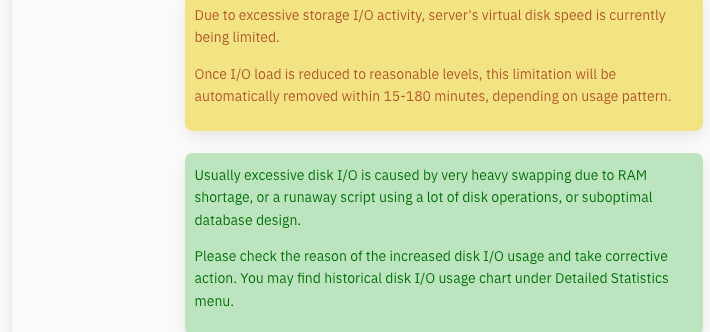
At this point, only one solution remains: force-reboot the node server.
Immediately after reboot, log into SSH and use the corresponding script to clear swap usage, then delete some instances to free resources.
Since containers take time to restart individually after reboot, this window may not delete many instances, but each reboot clears some.
Ultimately, when limiting instance counts, carefully assess node performance. Avoid overloading weaker nodes or those with strict constraints.
Issues Arising from Self-Compilation
Commonly encountered in source code deployment, Dockerfile, and Docker Compose deployment methods
Frequently observed in frontend compilation errors on ARM architectures
Directly deploy using pre-compiled Docker container images or binary files (most reliable approach)
Some commands cannot detect NAT mapping rules for Incus and LXD.
This is normal behavior.
Incus/LXD port mapping defaults to kernel-level NAT (DNAT + FORWARD) and does not create port listening processes on the host machine. Therefore, traditional port occupancy tools typically will not show any results.
For example, the following commands will not detect host port usage:
ss -lntup
lsof -i
netstat -lntpOnly by running:
incus config device show instance1or:
lxd config device show instance1to view configured port mapping rules, as traffic bypasses the host and forwards directly externally.
The correct method to check port mappings is to examine nftables rules
nft list rulesetor view only the NAT table:
nft list table ip natOn systems using iptables, use:
iptables -t nat -LIf traffic is flowing in or out, inspect actual connection states with:
conntrack -L | grep <port>How to fill in NAT IPv6 port mappings
In NAT IPv4 + IPv6 mode, do not enter an IPv6 address or /64 in the port-mapping dialog. The dialog only needs the instance, guest port, host port (or automatic allocation), port count, and TCP/UDP protocol. The panel creates the IPv4 and IPv6 rules for the same mapping together.
For Incus/LXD, NAT IPv4 + IPv6 maps the host public IPv6 to a guest ULA and does not consume the IPv6 address pool / node address file. Supplying a /64 file in this NAT mode mixes routed public addresses with NAT addresses. The updated panel hides that input and the controller no longer allocates static_ipv6 from it for Incus/LXD NAT guests.
Configure a /64 or individual IPv6 addresses only for modes where the guest owns a routed address, such as Dedicated IPv4 + Dedicated IPv6 or IPv6-only:
- use an absolute path on the node, for example
/etc/oneclickvirt/ipv6-pool.txt; - write one IPv6 address or CIDR per line;
/64denotes a pool/prefix and is not a single instance address; - after changing the file, run
Sync node filebefore creating an instance; this is not an input to NAT port mapping.
With NAT mode, the instance normally has a fd... ULA. External access uses the node's public IPv6 plus the mapped port, for example:
http://[node-public-IPv6]:10004/This is not a directly routed public IPv6 for the instance, and the node's public IPv6 must not be entered as the instance's publicIPv6. To give the instance a directly reachable public IPv6 /128, use Dedicated IPv4 + Dedicated IPv6 or IPv6-only, with upstream routing/NDP, host forwarding, and the guest route configured. Validate from a separate public IPv6 host; a request made inside the guest or from the host itself is not an external acceptance test.
Incus/LXD managed IPv6 NAT requires a public IPv6 on the host interface, an IPv6 default route, inbound access to the allocated host port, and an incusbr0/LXD bridge with IPv6 ULA, DHCP, and NAT enabled. device_proxy is recommended. External clients use [host-public-IPv6]:host-port, never a /64 value.